
Ask every patient for a review, automatically.
A short text or email goes out after each completed visit, straight from your practice software, so happy patients leave reviews while the visit is fresh.
- 3,200+ practices
- Google Premier Partner
- For doctors, by doctors
Get a free 30-minute demo
Built around your practice. No obligation.You agree to be contacted about your demo. Privacy policy. No patient information, please.
Thanks. We got your request.
We will reach out shortly to set up your 30-minute demo.Prefer to talk now? Call (800) 416-5235.
Steady, recent reviews win the click
Patients compare ratings, review counts and how recent the reviews are. A request sent right after every visit keeps all three moving in the right direction.
- Sent at the right momentTexts and emails go out shortly after the visit, while the experience is fresh.
- One tap to postPatients land on the right review site for your practice and provider, ready to write.
- By provider and locationRequests and reviews are tracked for each doctor and office.
- Never gatedEvery patient gets the same request, as Google and the FTC require.
Every patient asked, nobody filtered.
What we do
- Ask every patient the same way
- Remind once, then stop
- Link straight to the review site
What we never do
- Ask only happy patients (review gating)
- Offer gifts or discounts for good reviews
- Mention the reason for the visit
Requests that patients actually answer.
Completed visits trigger requests automatically; no exports or front-desk work.
Short, branded messages sent when patients are most likely to respond.
Straight to your Google, Healthgrades or Facebook review page.
Requests rotate across the sites where you need reviews most.
A single follow-up if a patient hasn't responded.
Patients who opt out are never asked again.
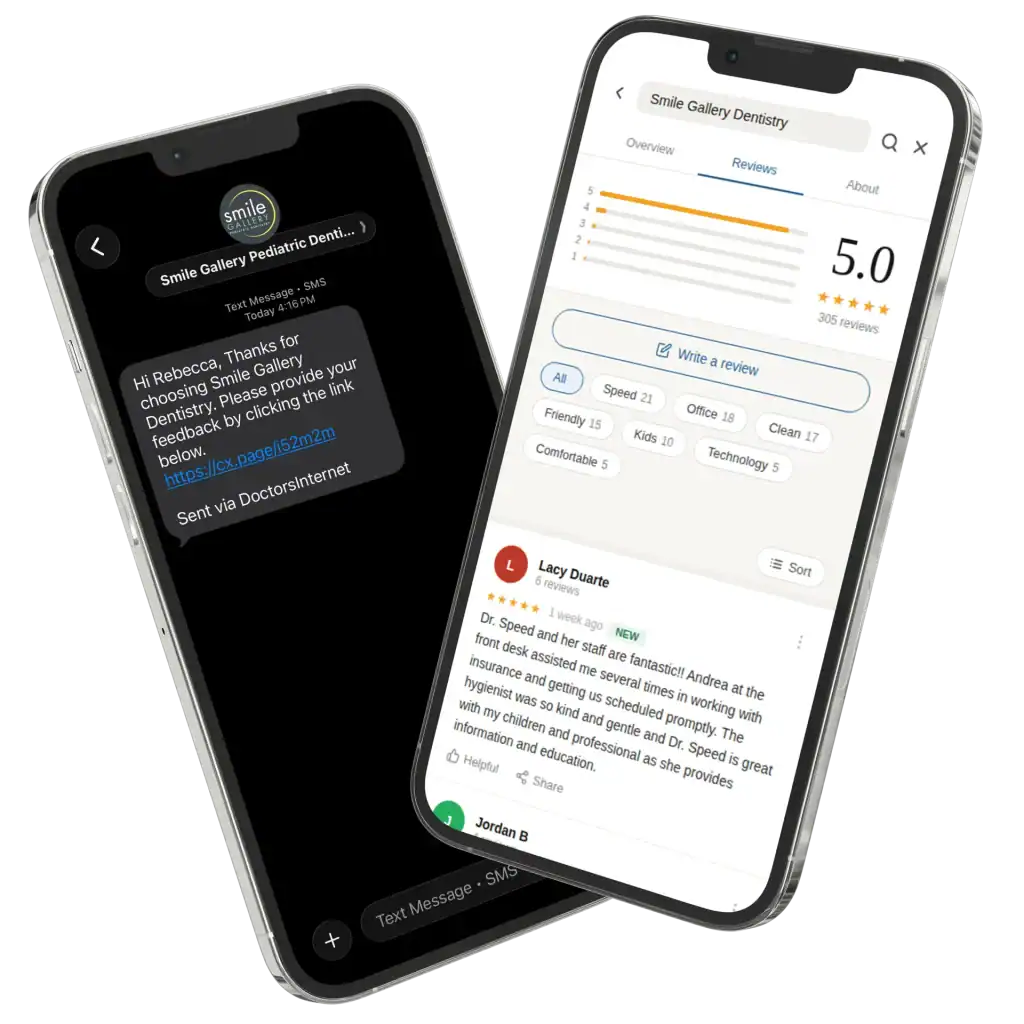
Three steps, then it runs every day.
- 01Visit completed
Your practice software marks the appointment done.
- 02Request sent
A text or email goes out, usually within hours.
- 03Review posted
New reviews appear in your dashboard and alerts.

Reviews for your specialty
Pick your practice type: where your patients leave reviews, the software we connect to, and your free audit.
Where dental patients leave reviews
- Yelp
- Healthgrades
- Zocdoc
Of people who use online reviews to find a new dentist, 81% use Google, 45% Yelp, 30% Facebook and 23% Healthgrades.Dandy Dental Study (Isurus Market Research), 2023
Works with your dental software
See all 75 dental integrations →Where medical patients leave reviews
- Healthgrades
- WebMD
- Vitals
- Zocdoc
52% of patients check WebMD and 27% check Healthgrades before choosing a provider.RepuGen Patient Review Survey, 2025
Works with your EHR or practice management software
See all 112 medical integrations →Where eye care patients leave reviews
- Healthgrades
- Zocdoc
- Yelp
Google is where 71% of people read reviews before choosing a local business.BrightLocal, 2026
Works with your eye care software
See all 6 eye care integrations →Where pet owners leave reviews
- Yelp
- Nextdoor
73% of pet owners in the UK and Australia check reviews most or every time before choosing a vet.Vetstoria pet owner research, Jan 2026
Works with your veterinary software
See all 31 veterinary integrations →Where chiropractic and PT patients leave reviews
- Healthgrades
- Yelp
- Zocdoc
90% of physical therapy patients were referred by a physician, and only 41% of people know they can see a PT directly.APTA Consumer Perceptions, Sep 2025
Works with your chiro or PT software
See all 18 chiro and PT integrations →Where therapy clients leave reviews
- Zocdoc
- Yelp
- Psychology Today (directory, no reviews)
Therapist ethics codes limit asking current clients for testimonials, so review requests are opt-in or turned off.APA 5.05 · ACA C.3.b · NASW 4.07b
Works with your practice software
See all 9 behavioral health integrations →Where hearing patients leave reviews
- Healthy Hearing
- Healthgrades
- Yelp
45% of people now use AI tools for local recommendations, and those answers draw on reviews.BrightLocal, 2026
Works with your audiology software
See all 5 audiology integrations →Where aesthetics patients leave reviews
- RealSelf
- Yelp
RealSelf ratings are moderated and doctors cannot pay to remove reviews, so a steady flow of new ones matters.RealSelf
Works with your aesthetics software
See all 5 aesthetics integrations →Review Requests questions
When is the best time to ask a patient for a review?
Soon after the visit. In a 2025 rater8 survey, 47% of patients said they are most likely to leave a review within 24 hours of an appointment, and 74% said they would leave one if their provider asked.
Is it allowed to text patients for reviews?
Yes, when patients have given you their mobile number for communication and can opt out at any time. Requests never mention the reason for the visit, and opt-outs are honored automatically.
Can we only ask patients who had a good visit?
No. Google prohibits selectively asking for positive reviews, often called review gating. Every patient gets the same request, and unhappy patients can still reach your office directly.
Which review sites do requests go to?
Mostly Google, where patients look first, plus Healthgrades, Facebook or other sites you choose. Requests can rotate so each site keeps getting fresh reviews.
Does it work with our practice software?
Yes. Requests trigger from most dental, medical, eye care, veterinary and therapy systems. See the Integrations page for the full list.