
Track every call from ad click to procedure.
See which Google Ads, keywords, listings and pages make the phone ring, which callers booked, and what treatment they had, so you know your true return on every dollar.
- 3,200+ practices
- Google Premier Partner
- For doctors, by doctors
Get a free 30-minute demo
Built around your practice. No obligation.You agree to be contacted about your demo. Privacy policy. No patient information, please.
Thanks. We got your request.
We will reach out shortly to set up your 30-minute demo.Prefer to talk now? Call (800) 416-5235.
Most new patients still call, and every missed call is a missed patient.
Online ads and listings mostly lead to a phone call, not a form. Without tracking, you can't tell which marketing works or how many callers never got through. Practices want to know:
- What's working?Which ad, listing or page made the phone ring.
- Did we answer?Missed calls and after-hours callers, flagged right away.
- Were they new patients?Real new-patient calls, not just call volume.
- How did the call go?Recordings for training and better front-desk scripts.

Clicks and CTR are the start. Calls and procedures are the result.
Google Ads reports click-through rate and can count calls from ads and website forwarding numbers. Call tracking adds what Google can't see: which calls were new patients and which booked treatment, so bidding follows revenue, not just clicks.
CTR & cost per click
Which ads and keywords earn the click
- Click-through rate by ad and keyword
- Cost per click and per call
- Search terms that bring patients
Calls by keyword
Counted as a conversion after a minimum length you set (Google Ads)
- Call ads and call assets tracked
- Website numbers swapped by ad click
- Conversations scored as new patients
Procedures & ROI
Matched to your practice management system
- Booked appointments per campaign
- Procedures completed per keyword
- Cost per new patient and return on spend
From the first click to the finished procedure.
Calls tied to the campaign, ad and keyword, alongside CTR and cost per click.
Callers matched to appointments and completed procedures in your PMS.
Cost per call, per new patient and return on ad spend by campaign.
Calls recorded with disclosure, transcribed and tagged new patient or not.
Maps, organic, website, social, email and print each get their own number.
Encrypted recordings, redaction and alerts without patient details.
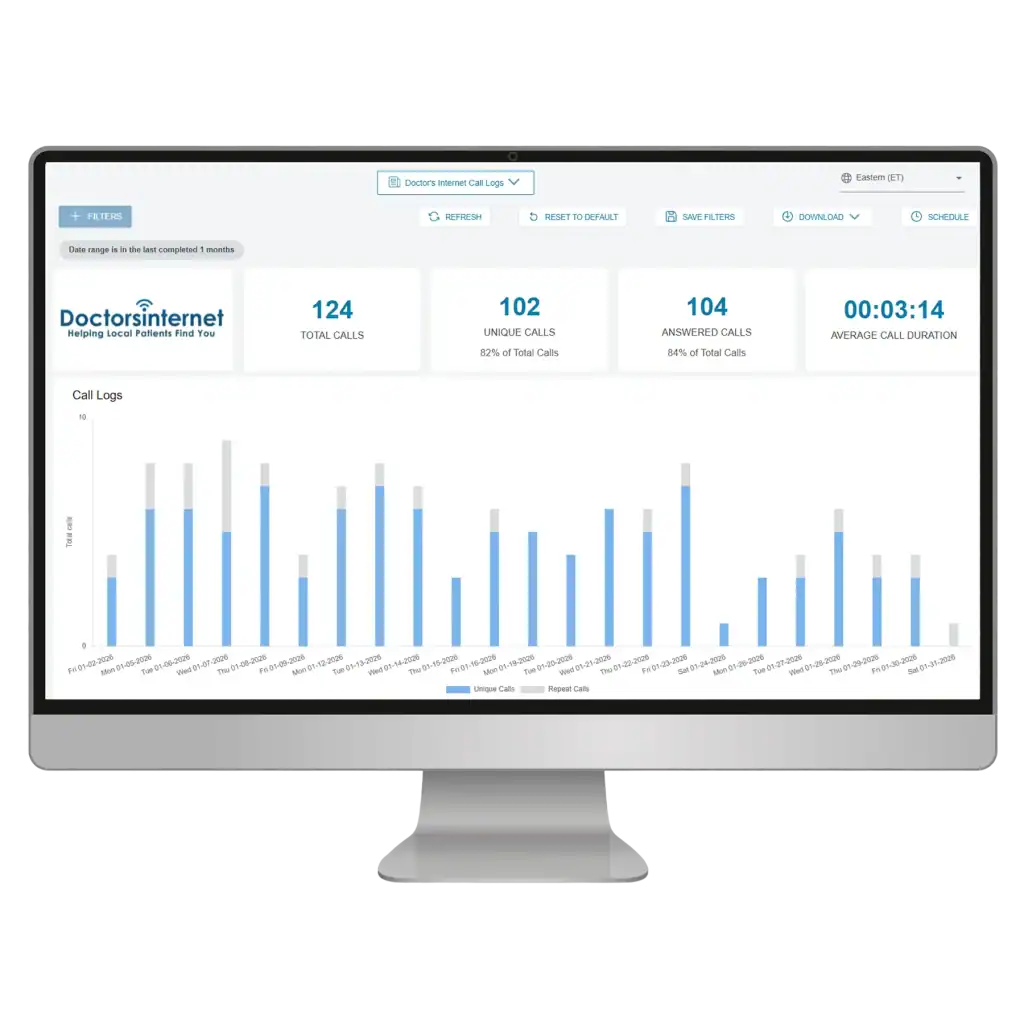
Live in days, no new phones needed.
- 01Set up numbers
Local tracking numbers for each source, forwarding to your current phone system.
- 02Connect & disclose
Website number swap, Google Ads linking and a recording disclosure added.
- 03Review & improve
Monthly report and call reviews to fix missed calls and improve scripts.
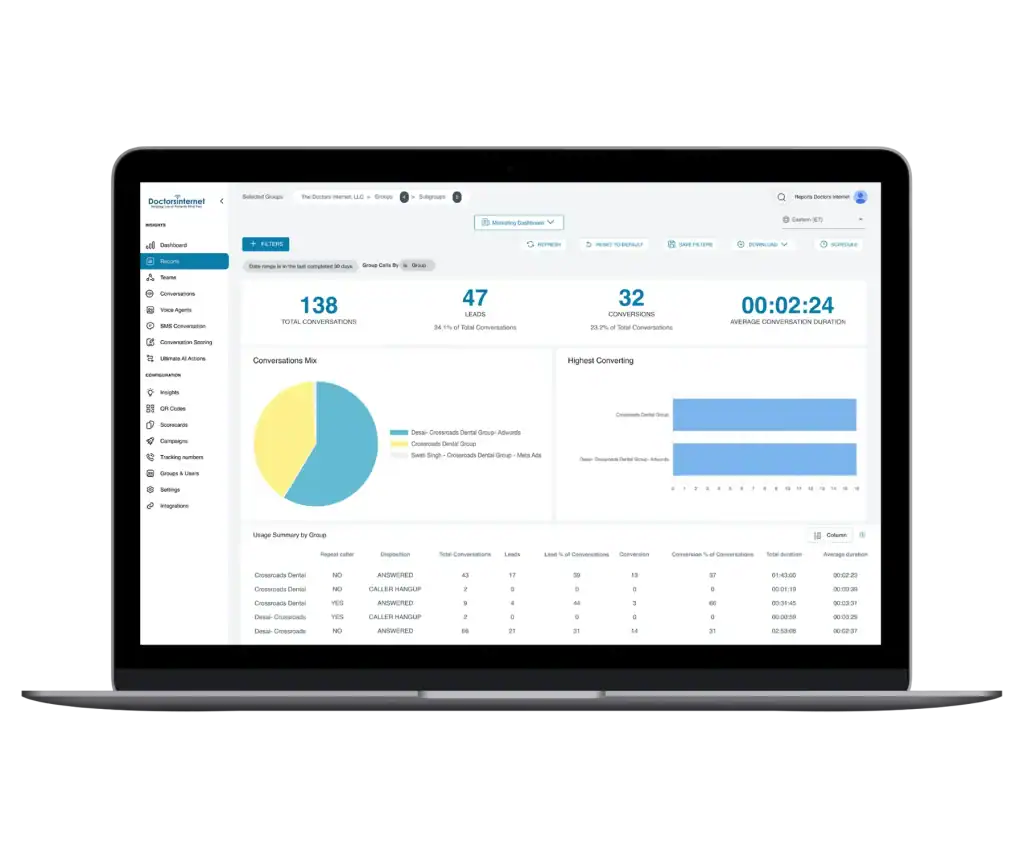
Follow every patient from the ad to the treatment.
Each step is tracked and connected, so the last number in the chain is real revenue, not an estimate.
- 01 · Ad clickCTR & cost per clickThe Google Ads campaign, ad and keyword that earned the click.
- 02 · CallCalls by keywordTracked number, recording and AI summary of the conversation.
- 03 · BookedNew-patient appointmentMatched to the appointment in your practice management system.
- 04 · ProcedureTreatment completedWhat the patient actually had done: implants, aligners, cleanings.
- 05 · ReturnFull ROIProduction per keyword, campaign and channel vs. what you spent.
Budget moves to the keywords and campaigns that produce treatment, not just clicks.
Proof, not guesses.
Most marketing reports stop at clicks or calls. Connecting calls to booked procedures shows exactly which campaigns grow production, so every budget decision is based on revenue.
"Dental implants near me" and "implant dentist" produced the most new-patient calls, and 2 of those callers completed implant treatment. "Teeth replacement cost" drove calls but no procedures yet…
Every channel gets its own number.
See exactly where each call came from, so budget goes to what works.
- Google search (organic)
- Google Business Profile
- Google Ads
Other online
- Website
- Social media
Offline
- Mailers
- Print & signs
- Radio & TV
- + any campaign
What's the difference?
Call tracking
Google's built-in call counts
We use both: Google's data for bidding, call tracking and your PMS for the full picture.
Common call tracking questions
What is call tracking for a dental or medical practice?
Call tracking assigns a phone number to each marketing source, so every call shows where it came from. Calls still ring your office; you get a log of source, length and outcome, recordings, missed-call alerts and monthly reports.
Can call tracking connect to our practice management system?
Yes. Calls are matched to appointments and completed procedures in your practice management system, so reports show new patients and production by campaign, keyword and channel, not just call counts.
How do you measure ROI from Google Ads?
We connect each step: ad clicks and CTR in Google Ads, calls by keyword, booked appointments and completed procedures from your practice management system. That gives cost per new patient and return on ad spend by campaign.
Will tracking numbers hurt our Google rankings?
Not when they’re set up correctly. Google asks for a phone number that connects to your location and is under your control. We keep your main local number consistent on your listings and use tracking numbers where they won’t confuse your name, address and phone details.
Is it legal to record patient calls?
Recording laws vary by state, and 13 states, including California and Florida, require every party’s consent. We add a short disclosure at the start of every call. Check with your counsel for your state.
Are call recordings covered by HIPAA?
Recorded calls with patient information are protected health information. Our call platform encrypts recordings and call records, offers redaction of sensitive details, and sends alerts without caller details, so recordings are reviewed only after logging in.
Do I need new phones or a new phone system?
No. Tracking numbers forward to your existing lines, so your team answers the same way they do today.
Can AI review our calls?
Yes. Calls can be transcribed and summarized automatically, with keyword spotting and lead scoring, so you can see which calls were new patients and how they were handled without listening to every recording.
Can you track calls from Google Ads?
Yes. Google Ads counts calls from ads and website forwarding numbers as conversions after a minimum call length, and we add the keyword, the outcome of the call and, with your practice management system connected, whether the caller booked and completed treatment.
How do I see the results?
In your Marketing Dashboard and a monthly report: calls by source, answered vs missed, new-patient calls, booked procedures and return on spend by campaign.